Photo size plays a crucial role in creating an appealing look for any type of photography. The size of a photo alone can make or break its overall impact. Regardless of the purpose behind your photography, choosing the right photo size is always essential to achieve optimal results.
Whether it’s for digital use or print, maintaining proper photo sizes is key to producing the desired effect on viewers. To do this effectively, you need to have a solid understanding of standard photo sizes. Don’t worry! This guide covers everything about photo sizes and explores standard photo dimensions in detail.
Standard photo size refers to the typical measurement of a photo that is widely accepted for a specific purpose. For instance, the standard photo size for a passport is 2.5 × 2 inches. This size is recommended for passports and is commonly used when printing passport photos.
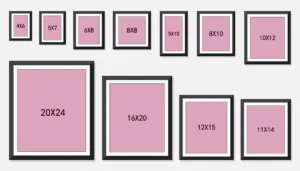
Different photo sizes serve different purposes, and each purpose comes with its own standard size. Therefore, a standard photo size does not mean a single size fits all uses. Various photos are used for different applications, and each has its own standard dimensions.
For example, profile photos are usually square, while content or feature photos often use 900px × 500px. Before diving deeper into photo sizes, it’s important to understand “what is the aspect ratio?” So, let’s explore the concept of aspect ratio.
What is an Aspect Ratio?
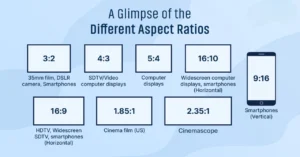
Aspect ratio is the relationship between the height and width of a photo. For example, a square photo has an aspect ratio of 1:1. This could mean dimensions like 512px × 512px or 20 × 20 inches. The aspect ratio is all about the shape of the photo, not its actual size.
When someone mentions a 2:3 photo, they are referring to a photo with a 2:3 aspect ratio. This could correspond to a size like 4 × 6 inches. Aspect ratios follow the basic rules of mathematical ratios, and they are always expressed in their simplest form.
Different Popular Aspect Ratios of Photos
Aspect ratios define the shape of a photo, and changing the aspect ratio can completely alter the way a photo looks. They are extremely important for photographers. While photo sizes can be adjusted during printing or editing, changing the aspect ratio is more complicated.
If you attempt to change the aspect ratio, the photo may get cropped, or the subject’s shape could be distorted. Therefore, it’s best to shoot your photos in the desired aspect ratio from the start.
1:1 Ratio
A 1:1 aspect ratio represents a square photo. Photos with this ratio are widely used for social media profile pictures and, in some countries, for passport photos. Examples include 8″ × 8″ or 1080 × 1080 pixels. This ratio is common for print photographs, mobile devices, and social media platforms, but it’s not suitable for most TV or digital formats.
3:2 Ratio
The 3:2 aspect ratio is another commonly used format. It is the standard ratio for film photography because it corresponds to the original 35mm film. This is why it is one of the most popular aspect ratios. Standard photo sizes like 1080 × 720 pixels and 6 × 4 inches follow this ratio.
4:3 Ratio
The 4:3 aspect ratio is most frequently used in computer screens, TVs, and digital cameras. For photos or films intended for screens, this ratio is recommended to ensure the image fits the display properly.
5:4 Ratio
The 5:4 aspect ratio is important for photography and art prints. Large photos and artwork often use this ratio. Standard photo sizes such as 8″ × 10″ and 16″ × 20″ are designed based on this format.
The Most Common Video Aspect Ratios
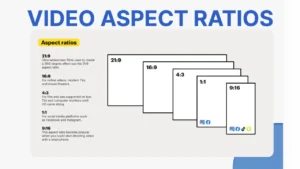
Similar to photos, videos also follow aspect ratios to match the intended display. Here are the most commonly used video ratios:
9:16 Ratio
The 9:16 aspect ratio is popular for videos, presentation slides, computer monitors, and widescreen TVs. Recently, it has become the international standard for video, gradually replacing the 4:3 ratio on monitors and TVs. This ratio creates a taller, more elongated rectangle compared to 4:3. Common resolutions in this format include 1920 × 1080 pixels and 1280 × 720 pixels.
16:9 Ratio
The 16:9 aspect ratio is widely used for vertical videos on social media platforms like Instagram, Facebook, and Snapchat. It is essentially the inverse of the 9:16 ratio and matches the vertical screen dimensions of smartphones. The most common size for this ratio is 1080 × 1920 pixels.
Right from the start, it’s important to understand that there isn’t a single standard photo size. The ideal photo size varies depending on the purpose of the photography. A standard photo size for a website is not the same as one for wall décor.
Similarly, standard photo sizes differ for social media posts, photo frames, promotional materials, and official documents. So, the size of your photo should be adjusted according to the purpose it is meant to serve.
Let’s take a look at some of the standard photo sizes for printing —
-
3 × 2
-
4 × 4
-
4 × 6
-
5 × 7
-
8 × 8
-
11 × 14
-
12 × 12
-
8 × 10
-
5 × 15
-
12 × 36
-
8 × 24
-
16 × 20
-
20 × 30
Now, let’s dive deeper and understand some of these photo sizes in detail —
Let’s take a closer look at some of these photo sizes —
4×6 Photo Size
Technically, 4×6 prints measure around 4” × 5 ⅞”. This is the standard size in the photofinishing industry because it matches the aspect ratio of most digital camera viewfinders.
Besides that, 4×6 prints are perfect for framed photos, greeting cards, and creating physical backups of your favorite digital images.
5×7 Photo Size
5×7 photo prints are slightly larger than 4×6 and feature a higher aspect ratio. Because of this, cropping images to match your desired composition is very important.
8×10 Photo Size
An 8×10 print is the largest common size before moving on to large-scale printing such as posters, panoramas, square prints, or custom items like canvases and large-format prints. 8×10 prints are ideal for gifts, as they typically do not require extra matting to fit into a frame.
Photo Sizes Chart
Photo sizes are commonly categorized into two series: the R series and the A series. The R series is used for standard photographic sizes, while the A series is used to measure paper sizes. Below are the tables for both series.
Standard Photographic Sizes – ‘R Series’
| Prints | Inches | CM | MM |
|---|---|---|---|
| R2 | 2.5 × 3.5 | 6.35 × 8.89 | 635 × 889 |
| 3R | 3.5 × 5 | 8.89 × 12.7 | 889 × 1270 |
| 4R | 4 × 6 | 10.2 × 15.2 | 1020 × 1520 |
| 5R | 5 × 7 | 12.7 × 17.8 | 1270 × 1780 |
| 6R | 6 × 8 | 15.2 × 20.3 | 1520 × 2030 |
| 8R | 8 × 10 | 20.3 × 25.4 | 2030 × 2540 |
| 10R | 10 × 12 | 25.4 × 30.5 | 2540 × 3050 |
International Paper Sizes – ‘A Series’
| Paper Size | Inches | CM | MM |
|---|---|---|---|
| A1 | 23.4 × 33.1 | 59.4 × 84.1 | 594 × 841 |
| A2 | 16.5 × 23.4 | 42.0 × 59.4 | 420 × 594 |
| A3 | 11.7 × 16.5 | 29.7 × 42.0 | 297 × 420 |
| A4 | 8.3 × 11.7 | 21.0 × 29.7 | 210 × 297 |
| A5 | 5.8 × 8.3 | 14.8 × 21.0 | 148 × 210 |
| A6 | 4.1 × 5.8 | 10.5 × 14.8 | 105 × 148 |
| A7 | 2.9 × 4.1 | 7.4 × 10.5 | 74 × 105 |
| A8 | 2 × 2.9 | 5.2 × 7.4 | 52 × 74 |
| A9 | 1.5 × 2.0 | 3.7 × 5.2 | 37 × 52 |
| A10 | 1 × 1.5 | 2.6 × 3.7 | 26 × 37 |
Square-sized Photo Print
Small photos are ideal for decoration, as they add texture and depth to a photo wall display. Square photos offer the flexibility to print images for social media and can also be used to create Polaroid-style prints without needing a special camera.
These sizes are commonly available at print shops and as framed prints. Some of the popular square photo print sizes include —
- 5×5
- 10×10
- 12×12
- 16×16
- 20×20
- 30×30
Large-sized Photo Print
Large photo prints are perfect for creating a “wow” factor in your wall décor or as a stunning centerpiece for a gallery wall. With large print sizes, such as premium posters, you can turn high-resolution photos into beautiful home décor without compromising quality.
Your favorite images will stand out, allowing you to relive memories with top-quality prints. Some popular large photo print sizes include —
-
10 × 13
-
10 × 20
-
11 × 14
-
16 × 20
-
18 × 24
-
20 × 24
-
20 × 30
These sizes are ideal for designing posters as statement pieces or creating large canvases that showcase your most treasured photos. Let’s also take a look at some of the most common large-scale photo prints —
-
12 × 18
-
14 × 22
-
16 × 20
-
20 × 30
To print non-traditional images, panoramic prints deliver the best results. They are available in both landscape and portrait orientations. Panoramic prints allow you to fully immerse yourself in your photo, whether it’s a scenic landscape or a large family portrait.
With wider panoramic prints, you don’t have to compromise on quality when printing wide-angle images. You can choose from various backgrounds and layouts to create your most unique photo sizes, such as —
-
5 × 15
-
8 × 24
-
12 × 36
Pick an Aspect Ratio to Fit Common Picture Sizes
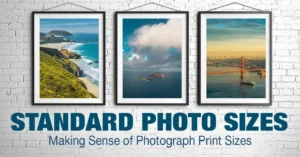
When choosing a standard frame for your artwork or photo, it’s essential to consider the orientation and make sure the frame matches the horizontal or vertical layout of your image.
Don’t hesitate to be creative when selecting photo print sizes! For instance, there are many ways to design a photo wall. You could create a grid using images in standard frame sizes.
Alternatively, you can combine small, medium, and large photos to craft a unique collage of your favorite memories. Some people even hang a single large-format photo as a standout piece.
When it comes to picture frame sizes, the options are almost endless. Feel free to experiment beyond a single standard print size. There’s plenty of room to showcase your creativity. There’s no such thing as a “good” or “bad” standard photo size—only what works best for you.
Resolution You Need for Standard Photo Print Sizes
When professional photographers talk about resolution, they mean the number of pixels displayed per inch of an image. This is measured in pixels per inch, or PPI. For digital cameras, the measurement is in megapixels, which indicates how much detail the camera’s image sensor can capture.
Higher-resolution photos have more pixels, producing sharper, high-quality images, while low-resolution photos contain fewer pixels. For example, enlarging a low-resolution image often reveals the pixels, resulting in a blurry picture.
When you use photo editing software to adjust the resolution, you are telling the program how many pixels to assign to each inch of the image. Therefore, it’s crucial to start with a high-resolution photo before editing. Ideally, begin with a quality image and reduce its size or PPI as needed.
What is the Aspect Ratio for Print Sizes?
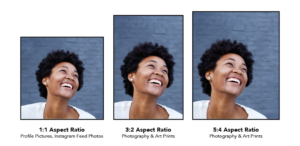
Instead of using units like inches or centimeters, the aspect ratio reflects the relationship between the width and height of an image. It is usually expressed in an x:y format, representing the shape rather than the actual size of the photo.
The aspect ratio can change depending on where your image is displayed. This is especially important for web content, where different ratios are required for desktop, mobile, landing pages, or social media. Using the correct ratio for each platform ensures that your images look perfect in your web design.
What is 1:1 Aspect Ratio?
Both sides of the image are equal, forming a perfect square. This ratio is ideal for social media profile photos.
What is 3:2 Aspect Ratio?
This ratio comes from the original 35mm film and is widely used in digital photography as well as film industries.
What is 4:3 Aspect Ratio?
Most computer monitors, TVs, and digital cameras use this ratio. Photos taken in 4:3 will properly fill these screens.
What is 16:9 Aspect Ratio?
This ratio is commonly used for computer monitors and widescreen TVs. It is slightly wider than 4:3.
What is 18:6 Aspect Ratio?
The 18:6 ratio is popular for panoramic landscape shots, providing an immersive experience. It’s perfect for displaying favorite holiday or scenic photos in your home décor.
Relevant Article:
How Big Is a 5×7 Photo? A Detailed Breakdown
How Big Is a 4×6 Photo? Complete Guide from Inches to Pixels
How to Select the Right Photo Sizes for Print
Before printing, consider where the photos will be displayed. If the prints are gifts, think about where the recipient will place them—whether as large poster-like wall prints or framed on a mantelpiece. They could also be in landscape or portrait orientation.
If you plan to mix different sizes, try cutting templates from colored paper and sticking them on the wall to visualize the layout. Also, consider the viewing distance of the printed image.
For example, a large wall poster may appear slightly pixelated up close, but since viewers typically look from a distance, the pixelation is less noticeable. On the other hand, a family portrait viewed up close must have the correct resolution to maintain quality.
When preparing photos for print, start by setting the right resolution and format. Printers can sometimes compensate for missing pixels, but excessive PPI may shrink the image and distort it.
Never enlarge a photo beyond its original size, as this reduces resolution and quality. When resizing, save your file as a PNG instead of a JPG to preserve pixel integrity.
Ideal Photo Sizes for the Web
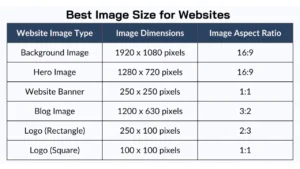
Understanding the correct image size is essential to ensure your photos fit properly on the web without stretching or distortion. Using the wrong image size can negatively affect the overall presentation on your website.
1920 × 1080 px: This size has a 16:9 aspect ratio and is widely used in photography, television, social media cover images, and more.
1280 × 720 px: Also with a 16:9 aspect ratio, this is a common HD format frequently used in photography and video content.
1080 × 1080 px: This is the standard 1:1 image size, popular on social media platforms like Instagram.
Full-Width Image Size: Some photos on your website, such as banners or main page images, may need to span the full width of the screen. To ensure they look good on all devices, a 16:9 aspect ratio is recommended, with a width ranging from 1500 px (minimum) to 2560 px (maximum). Using a larger image helps prevent important content from being cropped out by browsers.
Blog Post Image Size: Blog images are another special category. Engaging visuals capture attention in the digital age, so including photos in your blog posts is a must. It’s best to use images with consistent widths to maintain a neat and uniform appearance.
For example, if your blog’s content area is 800 px wide, choose images that are 800 px wide or smaller. Images larger than 800 px will be automatically resized, which may reduce quality.
Ideal Photo Sizes for Printing
Even though digital images dominate today, there is still a strong demand for printed photos. You might want to print family pictures to frame and preserve memories or print a passport photo for professional purposes.
Passport Printing: The recommended passport photo size is 2 × 2 inches.
Photo Printing: Standard sizes like 4 × 6 or 5 × 7 are widely used for artistic prints, greeting cards, or general photo printing. These sizes are popular in the printing industry.
Poster Printing: For posters or slightly larger photo mounts, 8.5 × 11 inches is suitable. For the best results, use a 4:3 aspect ratio and resize your photo to 3400 × 4400 px.
Ideal Photo Sizes for Social Media
Facebook Posts & Stories: The ideal size for Facebook posts is 1200 × 630 px, which ensures the image isn’t cropped or stretched. For Facebook stories, capture vertically with a 9:16 ratio and recommended resolution of 1080 × 1920 px.
Facebook Cover Photos: For cover images, the optimal size is 820 × 312 px, producing the best visual results.
Twitter Posts: Twitter uses different sizes depending on the number of images. A single photo should be 1200 × 675 px, while posting two photos works best at 700 × 800 px.
Twitter Cover Photos: A horizontal image sized 500 × 1500 px is ideal for Twitter cover images.
Instagram: Instagram primarily displays square images, so a 1:1 aspect ratio is perfect. The standard size is 1080 × 1080 px. If your photo exceeds this resolution, it’s best to resize it to avoid quality loss.
How Cutout Partner Ensures Flawless Photo Editing with Accurate Resizing
Cutout Partner blends professional photo editing skills with precise image resizing to deliver exceptional results for every project. Their workflow begins with detailed enhancements such as color correction, contrast balancing, and sharpness optimization, all while preserving the image’s natural appearance. After editing, each image is carefully resized to match its intended use—whether for eCommerce platforms, social media, websites, or print media.
Using pixel-accurate resizing methods, Cutout Partner eliminates quality loss, distortion, and improper cropping. This approach helps images load quickly, comply with marketplace requirements, and maintain a consistent visual style across multiple platforms. The outcome is crisp, high-quality imagery that appears refined, professional, and ready for digital or print use.
Cutout Partner is a trusted photo editing and post-production company serving clients worldwide. With a team of 50+ skilled Photoshop experts, they specialize in clipping path, background removal, photo retouching, image manipulation, and ghost mannequin services. Catering to eCommerce businesses, fashion brands, headshot professionals, and newborn photographers, Cutout Partner is relied upon by over 3,000 global clients for its superior quality, fast turnaround times, and cost-effective solutions—helping businesses grow through impactful and consistent visuals.
You might also read this articles
- How to Adobe Photoshop 7.0 Free Download (Updated Guide)
- A Complete Retouching Tips & Tricks: Cutout Partner
- Top 25 Sitting Poses Every Photographer Should Try for Stunning
- A Complete Guideline of Clipping Path: Cutout Partner
Winding Up –
Photos are captured for various purposes, but knowing the standard sizes for each use is essential. Without this knowledge, even stunning photos may not produce the best results in their intended context.
Photo resizing is an important part of this process. To fit photos into specific dimensions, you can use online resizing tools, but the most reliable option is Adobe Photoshop. Photoshop not only resizes images but also maintains their original quality, ensuring top-notch results every time.
FAQs on Standard Photo Sizes
1. What are standard photo sizes?
Standard photo sizes are commonly accepted dimensions for printing or displaying photos. They vary depending on the medium, purpose, and format, such as print, social media, or web use.
2. Why are standard photo sizes important?
Using standard photo sizes ensures your images fit properly in frames, websites, social media platforms, or print materials without cropping, stretching, or losing quality.
3. What is the most common photo size for printing?
The most common printing sizes are 4×6 inches, 5×7 inches, and 8×10 inches. These sizes are widely used for framed photos, greeting cards, and professional prints.
4. What is the difference between the R series and A series?
-
R Series: Standard photographic print sizes (e.g., 4R = 4×6 inches).
-
A Series: International paper sizes used for documents and larger prints (e.g., A4 = 8.3×11.7 inches).
5. What is the aspect ratio in photography?
The aspect ratio is the relationship between the width and height of a photo, expressed as X:Y (e.g., 4:3 or 16:9). It determines the shape of the image rather than its actual size.
6. Can I resize my photo to any size I want?
Yes, but resizing must maintain the correct aspect ratio to prevent distortion. Enlarging low-resolution photos can cause pixelation, while cropping may alter the composition.
7. What are ideal photo sizes for social media?
-
Instagram: 1080×1080 px (square 1:1), 1080×1350 px (portrait), 1080×608 px (landscape).
-
Facebook: 1200×630 px (posts), 1080×1920 px (stories), 820×312 px (cover photo).
-
Twitter: 1200×675 px (single post), 500×1500 px (cover photo).
8. What are ideal photo sizes for the web?
Common web sizes include 1920×1080 px (full-width images), 1280×720 px (HD format), and 1080×1080 px (square images for content or social media integration).
9. What photo size is recommended for passports?
The standard passport photo size is 2×2 inches. Ensure it follows your country’s official requirements.
10. What are panoramic photo sizes?
Panoramic prints are wider or taller than traditional sizes and usually come in formats like 5×15 inches, 8×24 inches, or 12×36 inches. They are ideal for landscapes or large group photos.
11. How do I choose the right photo size for printing?
Consider the purpose:
-
Framed prints: 4×6, 5×7, 8×10 inches
-
Posters: 8.5×11, 11×14, 16×20 inches
-
Panoramic shots: 5×15, 8×24, 12×36 inches
Also, check the viewing distance and resolution to maintain quality.
12. How do resolution and PPI affect photo size?
Resolution (PPI – pixels per inch) determines how many pixels are used per inch of an image. Higher resolution means sharper images. Low-resolution photos may appear blurry if enlarged.