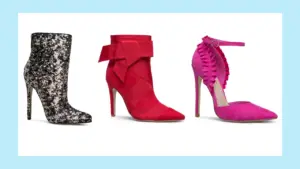
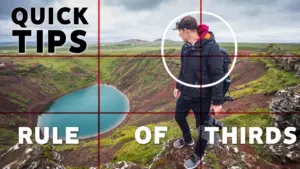
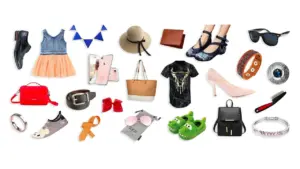
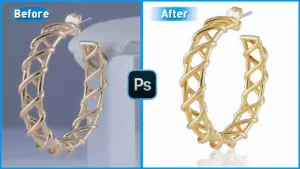
Photo retouching—often referred to as digital image retouching—is a focused branch of image editing designed to enhance the overall quality, clarity, and visual appeal of photographs. Professional photo retouching plays a vital role in achieving marketing objectives across a wide range of industries, including e-commerce, fashion and luxury brands, automotive businesses, and advertising agencies.
Skilled photo retouchers apply a variety of retouching methods that generally fall into three levels: basic, high-end, and advanced retouching. Widely used techniques include image resizing, color balancing and correction, unwanted object removal, shadow and reflection creation, e-commerce product enhancement, model and beauty retouching, background refinement, and glare or reflection removal.
High-quality visuals are essential for strengthening brand identity, building customer trust, and increasing conversion rates. Professional photographers, leading fashion houses, online retailers, and digital marketers consistently rely on expertly retouched images for marketing and branding purposes. To meet growing visual demands, streamline workflows, and maintain a competitive edge, they partner with experienced photo retouching service providers.
What Is Photo Retouching?
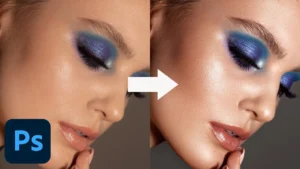
Photo retouching is a professional image editing process used to correct imperfections, enhance visual quality, and prepare photos for commercial use. Properly retouched images appear clean, balanced, and visually appealing, making them suitable for marketing materials, social media promotions, e-commerce product listings, and other online and offline campaigns.
A skilled photo retoucher applies a range of techniques, from basic adjustments to detailed enhancements, during post-production. These techniques include image resizing, background removal, color correction, tone adjustment, and refining contrast and brightness. Industry professionals commonly use tools such as Adobe Photoshop, Adobe Lightroom, GIMP, Skylum Luminar, and Affinity Photo to achieve consistent and high-quality retouching results.
Why Is Photo Retouching Important?
Photo retouching plays a vital role in enhancing image quality, correcting imperfections, presenting a professional brand image, capturing audience attention, and increasing conversion rates. Fashion labels, product manufacturers, online sellers, digital marketers, entrepreneurs, individual creators, and industries such as retail, e-commerce, and automotive rely on photo retouching services to gain these advantages.
According to a 2024 report by Data Intelo, the global photo retouching services market is projected to reach USD 5.8 billion by 2032. Professionally retouched images help maintain visual consistency across platforms, create emotional appeal, strengthen brand perception, and ultimately boost customer engagement and sales.
Why Is Photo Retouching Important for E-commerce Businesses?
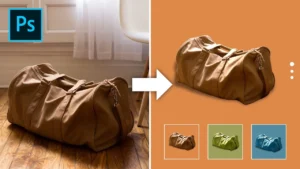
Photo retouching is essential for e-commerce businesses because it enhances product presentation, attracts customer attention, and helps boost conversion rates. For online retailers and product sellers, retouching improves image clarity, consistency, and overall visual appeal. A 2025 blog by Welpix, citing a Shopify study, states that high-quality product images can increase conversion rates by up to 250%. Leading platforms such as Amazon, eBay, and Shopify also enforce strict image quality standards that sellers must follow.
Professionally edited images grab attention, eliminate buyer uncertainty, and communicate product value more effectively. High-quality retouched visuals positively impact several key areas of an e-commerce business, including:
-
Building brand recognition and customer trust
-
Showcasing product quality, realism, and premium appeal
-
Driving higher traffic and improving conversion rates
-
Lowering product return rates through accurate representation
Why Is Photo Retouching Important for Fashion Brands?
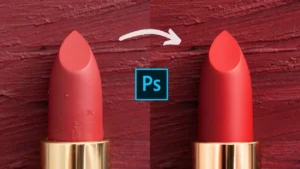
Photo retouching is essential for fashion brands to achieve clear, polished, and flawless visuals for apparel, footwear, jewelry, beauty products, cosmetics, and accessories. Both established and emerging fashion labels rely on consistent, high-quality imagery across all marketing and sales platforms. Professionally retouched photos offer several key advantages to the fashion industry, including:
-
Enhancing the visual appeal of products to attract potential customers
-
Establishing strong visual impact with high-end, professional imagery
-
Clearly highlighting product details, features, and benefits
-
Helping increase website traffic, customer engagement, and overall sales
Why Is Photo Retouching Important for Digital Marketing & Advertising?
Photo retouching is crucial for online marketing and advertising because it ensures high-quality visuals that clearly communicate brand messages and increase audience engagement. According to a 2024 HubSpot blog, 47% of digital marketers use images that perform effectively across all social media platforms. Marketers rely on compelling visuals as part of their digital strategies to stand out in competitive markets.
Professionally retouched images influence online marketing and advertising in several impactful ways, including:
-
Communicating brand stories and messages clearly and effectively
-
Strengthening brand credibility and maintaining a professional image
-
Supporting successful campaign launches across digital channels
-
Increasing traffic, boosting engagement, and converting audiences into customers
Why Is Photo Retouching Important for Professional Photographers?
Photo retouching is essential for professional photographers to highlight their talent and craftsmanship through polished portfolios. In a highly competitive, image-focused market, retouching adds an artistic, refined, and professional finish to their work. By enhancing their photos, photographers gain several key benefits, including:
-
Delivering consistently high-quality images
-
Demonstrating technical skill and creative expertise
-
Attracting viewers’ attention and creating emotional impact
-
Meeting client expectations and ensuring satisfaction
What Are the Different Types of Photo Retouching?
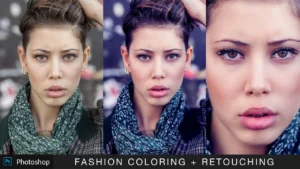
Photo retouching can be categorized into multiple types based on image purpose, subject matter, and industry requirements. There are generally 18 major types of photo retouching, each serving a distinct visual and commercial goal.
1. High-End Retouching
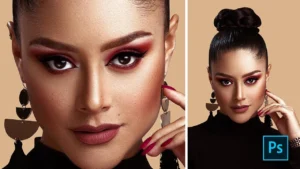
High-end retouching is a refined and artistic editing approach that enhances images without damaging pixel integrity. It is designed to meet premium visual standards in commercial photography by removing imperfections, refining details, and creating rich, dramatic color tones while keeping the image natural.
Use cases: Fashion photography, e-commerce, advertising, model shoots, real estate, and portrait photography.
2. Portrait Retouching
Portrait retouching focuses on editing images of people to enhance their overall appearance. Retouchers adjust skin tones, remove blemishes, eliminate stray hair, brighten teeth, and refine facial details, ensuring the image reflects personality and mood.
Use cases: Model photography, magazines, advertising campaigns, and editorial publications.
3. Headshot Retouching
Headshot retouching is limited to facial enhancement only. The goal is to improve facial features while maintaining a natural look. Removing blemishes and minor imperfections results in a fresh, professional appearance that builds trust and approachability.
Use cases: Corporate profiles, business portraits, social media profiles, and the entertainment industry.
4. Product Retouching
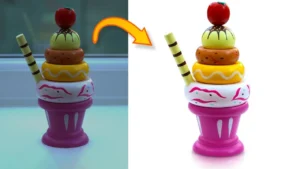
Product retouching enhances product photos by correcting color, size, and shape, removing distractions, and improving clarity. Well-retouched product images look realistic, increase buyer confidence, boost sales, and reduce product returns.
Use cases: E-commerce, food industry, electronics, beauty products, and healthcare.
5. Commercial Retouching
Commercial retouching is used for marketing and promotional visuals. The objective is to create eye-catching images that attract attention, convey brand value, and drive engagement through lighting adjustments, photoshop color correction, and feature enhancement.
Use cases: Digital advertising, print media campaigns, and brand promotions.
6. Fashion Retouching

Fashion retouching is a specialized process for fashion products and models. It emphasizes color accuracy, texture, and fine details while removing flaws and enhancing resolution. This category often overlaps with beauty, model, and product retouching.
Use cases: Apparel, footwear, cosmetics, skincare, jewelry, accessories, healthcare brands, and fashion photographers.
7. Beauty Retouching
Beauty retouching applies to both beauty products and model images. It ranges from basic edits to advanced retouching, including color correction, symmetry refinement, and skin enhancement, helping audiences visualize product effectiveness.
Use cases: Cosmetics brands, skincare companies, health products, online marketers, and model photography.
8. Model Photo Retouching
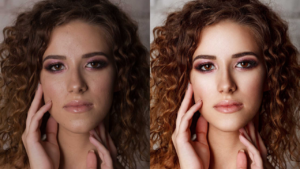
Model retouching enhances lifestyle and fashion model images, making them polished and visually appealing. It includes retouching skin, hair, face, and body to achieve a flawless yet realistic appearance.
Use cases: Fashion brands, beauty brands, photographers, advertising agencies, e-commerce stores, and influencers.
9. Body Retouching
Body retouching involves adjusting body proportions and appearance. Techniques include slimming, reshaping, cellulite reduction, curve enhancement, and height adjustments to present ideal body aesthetics.
Use cases: Fashion brands, fitness and health products, beauty companies, advertising agencies, and e-commerce businesses.
10. Skin Retouching
Skin retouching removes temporary imperfections such as acne, pores, and minor blemishes while preserving permanent features like moles and birthmarks. The goal is smooth, glowing skin without an artificial look.
Use cases: Beauty and fashion industries, influencers, professional photographers, and modeling portfolios.
11. Hair Retouching
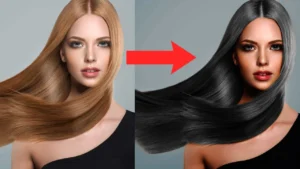
Hair retouching focuses on correcting frizzy, loose, or uneven hair. It includes flyaway removal, volume adjustment, shine enhancement, texture refinement, and color correction for a clean, styled look.
Use cases: Fashion, beauty brands, e-commerce, and online advertising.
12. Makeup Retouching
Makeup retouching enhances facial makeup details such as eyes, eyebrows, lips, cheeks, and jawline. It highlights product features while maintaining a natural and professional appearance.
Use cases: Cosmetic brands, social media influencers, photographers, and e-commerce platforms.
13. Glamour Retouching
Glamour retouching digitally enhances a model’s overall look by refining facial features, smoothing skin, adjusting colors, fixing hair, and removing imperfections to create visually striking images.
Use cases: Fashion and cosmetic advertising, lifestyle photography, portrait photography, and print media.
14. Editorial Retouching
Editorial retouching is used for magazine and editorial publications. It supports storytelling and concept-driven visuals through aesthetic improvements, detail enhancement, and occasional photo restoration.
Use cases: Magazines, print media, billboards, publishing houses, and art exhibitions.
15. Creative Retouching
Creative retouching blends artistic vision with advanced techniques such as compositing, blending, reshaping, painting, and custom effects. The results are imaginative, bold, and visually engaging.
Use cases: Conceptual art, brand campaigns, surreal imagery, and creative advertising.
16. Old Photo Retouching
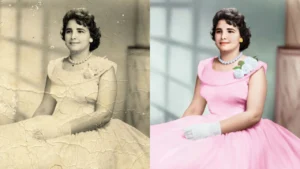
Old photo retouching restores damaged or aged photographs by fixing scratches, tears, fading, water damage, and blur. It enhances clarity and revives emotional value, similar to photo restoration.
Use cases: Personal memories, family archives, and historical image preservation.
17. Packshot Retouching
Packshot retouching improves packaging and branded product images. It ensures labels, ingredients, and text are sharp, readable, and visually appealing for customers.
Use cases: E-commerce product listings, cosmetics, beauty products, and branded merchandise.
18. Stock Photo Retouching
Stock photo retouching prepares images for commercial licensing by adjusting exposure, color balance, sharpness, noise, and overall aesthetics. This increases image usability and market value.
Use cases: Professional photographers and stock image platforms.
19. Real Estate Photo Retouching
Real estate retouching enhances property images by correcting lighting, adjusting colors, straightening lines, and removing unwanted objects. It improves spatial clarity and highlights architectural details to make properties more attractive to buyers.
Use cases: Real estate listings, property websites, brochures, rental platforms, and real estate marketing campaigns.
20. Background Retouching
Background retouching focuses on cleaning, replacing, or enhancing image backgrounds. It removes clutter, adjusts colors, adds shadows, or replaces backgrounds to ensure the subject stands out clearly.
Use cases: E-commerce product photos, portraits, advertising visuals, and social media images.
21. Shadow & Reflection Retouching
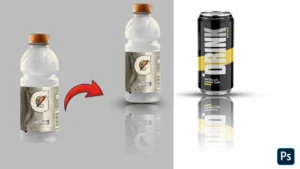
This retouching type adds or refines shadows and reflections to create depth and realism. Natural-looking shadows and reflections make products appear grounded and professional.
Use cases: E-commerce product images, catalog photography, advertising visuals, and packshot photos.
22. Color Correction & Grading
Color correction retouching adjusts white balance, exposure, contrast, and saturation for accuracy. Color grading adds a consistent tone or mood to images for branding and storytelling.
Use cases: Fashion photography, branding campaigns, social media marketing, and editorial photos.
23. Jewelry Retouching
Jewelry retouching enhances gemstones and metals by improving shine, clarity, and color while removing dust, scratches, and reflections. It highlights intricate details and luxury appeal.
Use cases: Jewelry e-commerce stores, catalogs, advertising, and luxury brand promotions.
24. Food Photo Retouching
Food retouching enhances texture, color, and freshness while correcting lighting and removing imperfections. It makes food look appetizing and visually appealing.
Use cases: Restaurant menus, food delivery apps, cookbooks, food blogs, and advertising.
25. Automotive Photo Retouching
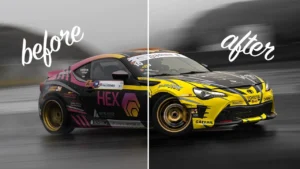
Automotive retouching improves vehicle images by enhancing paint color, removing reflections, cleaning backgrounds, and sharpening details to present cars in their best form.
Use cases: Car dealerships, automotive advertising, catalogs, and online marketplaces.
26. Lifestyle Photo Retouching
Lifestyle retouching refines natural images while keeping an authentic look. It balances lighting, skin tones, and background elements to create relatable, emotion-driven visuals.
Use cases: Social media campaigns, brand storytelling, blogs, and influencer marketing.
27. Event Photo Retouching
Event retouching enhances photos taken at weddings, corporate events, concerts, and celebrations by improving lighting, color consistency, and facial clarity.
Use cases: Wedding albums, event promotions, corporate documentation, and social media sharing.
28. Architectural Retouching
Architectural retouching enhances building images by correcting perspective distortion, removing distractions, and improving lighting and color balance.
Use cases: Architecture portfolios, real estate marketing, construction companies, and design publications.
29. E-commerce Bulk Retouching
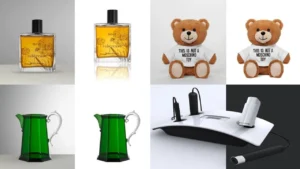
Bulk retouching focuses on editing large volumes of product images consistently and efficiently. It ensures uniform style, background, and quality across thousands of listings.
Use cases: Large online stores, marketplaces, dropshipping businesses, and wholesale sellers.
30. Social Media Photo Retouching
Social media retouching optimizes images for platform-specific formats and aesthetics. It enhances colors, sharpness, and composition to increase engagement.
Use cases: Instagram, Facebook, TikTok, LinkedIn marketing, and influencer content.
31. Wedding Photo Retouching
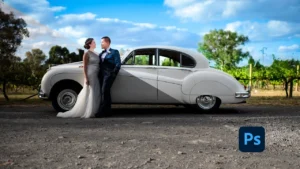
Wedding photo retouching enhances romantic moments by improving lighting, skin tones, and color balance while removing distractions. It preserves emotional authenticity and delivers timeless, elegant images.
Use cases: Wedding albums, photo books, online galleries, and social media sharing.
32. Newborn & Baby Photo Retouching
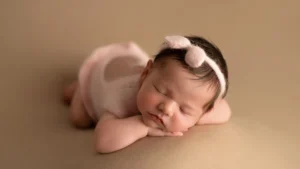
This retouching style focuses on gentle skin smoothing, color correction, and background cleanup while maintaining natural softness and safety.
Use cases: Newborn photography, family albums, maternity portfolios, and studio promotions.
33. Corporate Photo Retouching
Corporate retouching enhances professionalism by refining headshots, team photos, and workplace imagery without over-editing.
Use cases: Company websites, LinkedIn profiles, annual reports, and corporate branding.
34. Lifestyle Product Retouching
Lifestyle product retouching integrates products naturally into real-life settings, balancing realism with visual appeal.
Use cases: Brand campaigns, social media ads, e-commerce hero images, and catalogs.
35. Cosmetic Product Retouching
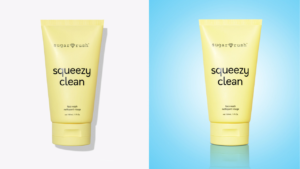
This retouching enhances packaging, labels, and product textures while maintaining accurate color and brand identity.
Use cases: Cosmetics websites, beauty e-commerce stores, product launches, and advertisements.
36. Flat Lay Retouching
Flat lay retouching improves overhead product shots by aligning composition, cleaning backgrounds, and balancing shadows.
Use cases: Fashion e-commerce, social media posts, lookbooks, and editorial layouts.
37. Lookbook Retouching
Lookbook retouching ensures stylistic consistency across fashion collections by refining models, clothing textures, and colors.
Use cases: Fashion catalogs, seasonal collections, brand websites, and digital lookbooks.
38. Sports Photo Retouching
Sports retouching enhances motion, contrast, and clarity to emphasize action and energy while removing visual distractions.
Use cases: Sports media, athlete branding, advertising, and editorial publications.
39. Action Photo Retouching
Action retouching sharpens fast-moving subjects, enhances dramatic lighting, and improves impact without losing realism.
Use cases: Adventure photography, sports marketing, outdoor brands, and editorial content.
40. Travel Photo Retouching
Travel retouching enhances landscapes, architecture, and cultural elements while maintaining authenticity.
Use cases: Tourism marketing, travel blogs, magazines, and social media campaigns.
41. Landscape Photo Retouching
Landscape retouching improves sky, color depth, contrast, and sharpness while preserving natural realism.
Use cases: Nature photography, travel publications, wall art, and stock images.
42. Drone Photo Retouching
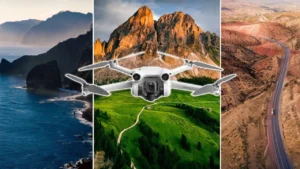
Drone retouching enhances aerial images by correcting distortion, exposure, and haze for clear, cinematic results.
Use cases: Real estate, tourism, construction, and environmental documentation.
43. Industrial Photo Retouching
Industrial retouching highlights machinery, processes, and facilities by improving clarity and removing distractions.
Use cases: Manufacturing websites, corporate brochures, and industrial marketing.
44. Scientific & Medical Photo Retouching
This retouching ensures clarity and accuracy while enhancing visibility without altering factual content.
Use cases: Research publications, healthcare marketing, medical training materials.
45. Documentary Photo Retouching
Documentary retouching preserves realism while correcting exposure and color balance.
Use cases: Journalism, historical archives, educational content, and exhibitions.
46. Black & White Photo Retouching
Black and white retouching refines tonal balance, contrast, and texture to create timeless imagery.
Use cases: Fine art photography, portraits, editorials, and galleries.
47. Conceptual Photo Retouching
Conceptual retouching turns ideas into visual storytelling using advanced manipulation techniques.
Use cases: Creative advertising, art projects, branding concepts.
48. HDR Photo Retouching
HDR retouching balances highlights and shadows to produce detailed, dynamic images.
Use cases: Real estate, landscapes, architecture, and interior photography.
49. Macro Photo Retouching
Macro retouching enhances close-up details by removing dust, noise, and color inconsistencies.
Use cases: Jewelry, insects, textures, product details, and scientific imagery.
50. Image Restoration Retouching
Restoration retouching repairs damaged, faded, or torn images, bringing them back to life.
Use cases: Family archives, museums, historical preservation.
What Are the Different Photo Retouching Techniques?
Photo retouching techniques involve a variety of editing methods to enhance images, correct flaws, and improve overall visual appeal. Common techniques include color adjustment, image resizing, shadow creation, noise reduction, e-commerce product retouching, image toning, dodge and burn, and reshaping.
These techniques are generally classified into three main levels, based on complexity and purpose:
-
Basic Level Photo Retouching Techniques
-
High-End Photo Retouching Techniques
-
Advanced Photo Retouching Techniques
Basic Photo Retouching
Basic photo retouching focuses on essential edits to improve image quality and visual appeal. It addresses primary corrections and ensures images are clean, balanced, and ready for publishing. Key techniques in basic retouching include:
-
Photo Culling: Photo culling is the process of sorting images based on quality before post-production. Retouchers separate images into categories to identify the best shots for editing. There are two types:
-
Culling In: Sorting images from best to worst.
-
Culling Out: Sorting images from worst to best.
-
-
Color Adjustment: Adjusting colors, white balance, contrast, exposure, brightness, and intensity to achieve a natural and well-balanced look.
-
Hue and Saturation: Hue adjusts color variations, while saturation controls color intensity. These adjustments reveal color nuances not visible during the photoshoot.
-
Image Resizing: Resizing ensures images meet the specifications of e-commerce platforms, social media, or print media. Editors follow publishing guidelines for optimal display.
-
Objects Removing: Removes unwanted or distracting objects to create clean and clutter-free images using tools like Content-Aware Fill, Clone Stamp, Patch Tool, Lasso Tool, or Object Selection Tool.
-
Shadow Creation: Adds artificial shadows to enhance realism. Types include natural shadows, drop shadows, reflection shadows, floating shadows, and cast shadows. Retouchers use brush tools, blur effects, and masking techniques for authenticity.
-
Noise Reduction: Reduces pixelation or grain caused by low light, high ISO, or digital artifacts while maintaining a natural appearance.
-
Product Cleanup: Removes dust, scratches, and distractions for clear and polished product images.
-
Image Dimensions & Resolution: Sets the height, width, and pixel density for optimal quality across digital or print platforms. Higher resolution ensures detailed and sharp images.
High-End Photo Retouching
High-end retouching delivers professional, precise, and commercially appealing images. It requires advanced skills and is widely used in fashion, advertising, and e-commerce. Techniques include:
-
Beauty Retouching: Enhances facial features, smooths skin, removes blemishes, adjusts eyes, whitens teeth, and ensures natural, professional results.
-
Skin Smoothing & Wrinkle Adjustment: Refines skin texture while maintaining realism and age-appropriate features.
-
Stray Hair Removal & Makeup Enhancement: Creates polished, voluminous hair and emphasizes makeup naturally.
-
Model Figure Editing & Airbrushing: Adjusts body proportions subtly and removes imperfections for a professional look.
-
Image Toning: Controls warmth, coolness, or contrast to create the desired mood and style.
-
Background Adjustment: Swaps, removes, blurs, or modifies backgrounds to maintain visual consistency.
-
Dodge and Burn: Adjusts lightness and darkness to enhance depth, contrast, and dimensionality.
-
Photo Reshaping & Spot Removal: Alters shapes, posture, or proportions while removing blemishes and distractions for flawless images.
-
Scratch & Reflection Removal: Removes scratches from products or unwanted reflections in photos, often using advanced software tools.
-
Clipping Path & Masking: Isolates subjects or layers for precise editing without affecting other areas of the image.
-
E-commerce Retouching: Includes color correction, background removal, shadow creation, sharpening, resizing, and product cleanup to create high-quality product visuals.
Advanced Photo Retouching Techniques
Advanced retouching is the most intricate level, delivering highly creative, customized, and professional-standard images. Techniques include:
-
Frequency Separation: Separates texture and color layers for precise skin or product adjustments without data loss.
-
Color Grading & Correction: Ensures vibrant and accurate color representation using curves and color layers.
-
Creative Compositing: Combines multiple images or elements into a single, cohesive visual for a new perspective.
-
HDR Retouching: Enhances dynamic range by balancing highlights and shadows, often used in real estate photography.
-
People & Object Placement: Adds, removes, or repositions subjects and objects to create balanced and compelling compositions.
-
Ghost Mannequin Effect: Removes mannequins from apparel images while maintaining volume and fit for a professional product display.
-
Shape & Silhouette Correction: Refines product outlines using tools like Liquify, Warp, Clone Stamp, and Adjustment Layers.
-
Curves Adjustment: Adjusts tonal range and brightness to achieve precise control over shadows and highlights.
-
Liquify Effect: Artistic manipulation to warp or reshape features while keeping the image data intact.
-
Digital Makeup & Body Swapping: Applies digital cosmetics and swaps body parts for enhanced visual appeal.
-
Reflection & Glare Removal: Eliminates unwanted reflections and glare to improve clarity, often applied in fashion, automotive, or product photography.
What Is the Difference Between Photo Editing and Photo Retouching?
Photo editing and photo retouching are closely related but differ in terms of alteration level, focus, output, and purpose. Understanding the distinction is essential for photographers, marketers, and businesses using images for personal or commercial needs.
| Parameter | Photo Editing | Photo Retouching |
|---|---|---|
| Definition | Photo editing refers to general adjustments and modifications applied to images. | Photo retouching is a specialized subset of editing techniques aimed at enhancing and perfecting images. |
| Alteration Level | Involves all types of changes to improve or modify image content, including basic corrections. | Focused on improving images to make them look flawless, polished, and visually appealing. |
| Focus | Targets overall image modifications such as color adjustment, cropping, resizing, and applying filters. | Focuses on precise enhancements, correcting flaws, and refining subjects to appear flawless. |
| Output | Produces images that are generally improved and balanced. | Produces images that are highly polished, professional, and often surreal in appearance. |
| Purpose | Serves as a foundation for any type of photo modification, for personal or commercial use. | Primarily used for commercial, promotional, and marketing purposes, delivering high-quality visuals. |
Which Are The Tools Used For Photo Retouching?
Tools Used for Photo Retouching
Photo retouching relies on specialized tools to correct imperfections, enhance details, and create professional-quality images. Key tools include Healing Brush Tool, Spot Healing Brush Tool, Red Eye Tool, Patch Tool, Content-Aware Tool, Clone Tool, Pattern Stamp Tool, Dodge & Burn Tool, Blur & Sharpen Tool, Color Replacement Tool, and Liquify Tools. Here’s a detailed overview:
1. Healing Brush Tool
The Healing Brush Tool in Photoshop removes imperfections while maintaining texture and uniformity. Users can correct areas precisely without affecting surrounding pixels.
Navigation:
-
Click the Healing Brush Tool from the toolbox.
-
Press Alt and click to sample the area you want to clone.
-
Click and drag over the imperfection to apply changes.
2. Spot Healing Brush Tool
The Spot Healing Brush Tool automatically samples surrounding pixels to fix small blemishes or flaws quickly, without manual selection.
Navigation:
-
Select Spot Healing Brush Tool from the toolbox.
-
Adjust size, hardness, mode, and type from the top menu.
-
Click or drag on the target area, and the tool heals spots automatically.
3. Patch Tool
The Patch Tool removes larger flaws, unwanted objects, or blemishes by blending the selected area with another part of the image.
Navigation:
-
Click the Patch Tool from the same panel as the Healing Brush Tool.
-
Select the area to remove and drag it to the region you want to blend.
4. Content-Aware Tool
The Content-Aware Tool removes unwanted objects and automatically fills the selected area with matching surroundings.
Navigation:
-
Select the object with any selection tool.
-
Go to Edit > Fill, choose Content-Aware, and click OK.
5. Red Eye Tool
Used to correct red eyes in flash photography, this tool removes the red pupil effect from portraits and headshots.
Navigation:
-
Click the Red Eye Tool in the toolbox (below Healing Brush).
-
Click or drag around the eyes to remove red coloration.
6. Clone Tool
The Clone Tool duplicates a specific area to cover unwanted spots or complex patterns. It is ideal for portrait, product, and detailed photography.
Navigation:
-
Select the Clone Stamp Tool from the toolbar.
-
Alt-click to sample the area.
-
Paint over the area to cover flaws. (The plus sign shows the source; the brush shows where it pastes.)
7. Pattern Stamp Tool
The Pattern Stamp Tool applies patterns to selected areas for creative effects or designs.
Navigation:
-
Click the Clone Stamp Tool and select Pattern Stamp Tool as the second option.
-
Choose a brush and pattern from the palette.
-
Adjust size, shape, and opacity, then paint the pattern onto the image.
8. Dodge & Burn Tool
Dodge and Burn are used to lighten (dodge) or darken (burn) areas in an image to enhance depth, shadows, and highlights.
Navigation:
-
Select the Dodge Tool from the toolbar.
-
Access the Burn Tool from the same panel.
-
Paint over areas to adjust brightness or darkness as needed.
9. Blur & Sharpen Tool
The Blur Tool softens areas of an image, while the Sharpen Tool emphasizes edges and details. Both are used to control focus and visual impact.
Navigation:
-
Select the Blur Tool from the toolbar.
-
The Sharpen Tool is accessible from the same panel.
-
Adjust size and apply as required to enhance or soften details.
10. Color Replacement Tool
This tool replaces a color in the image with a new one, useful for changing foreground or background colors.
Navigation:
-
Select the Brush Tool from the toolbar.
-
Choose the Color Replacement Tool from the panel.
-
Select the new color and brush over the target area to replace it.
11. Liquify Tools
Liquify Tools create artistic distortions, allowing users to pull, push, rotate, or warp parts of an image while preserving quality.
Navigation:
-
Go to Filter > Liquify in Photoshop.
-
Use tools within the Liquify panel to adjust or manipulate the image as desired.
Which Software Professionals Use to Retouch Photos?
Professional photo retouchers rely on advanced software to enhance images, remove flaws, and produce commercial-quality visuals. The market offers a wide variety of photo editing programs, each equipped with specialized retouching tools. By applying professional photo retouching techniques, retouchers bring out the best in every image. The top 10 software used for photo retouching are as follows:
1. Adobe Photoshop
Adobe Photoshop is a globally recognized photo editing and retouching software. It provides a comprehensive set of tools, including layers, healing tools, masking, content-aware fill, and cloning tools. The premium subscription starts at $22.99/month.
2. Adobe Lightroom
Adobe Lightroom is widely used for professional photo retouching. It offers adjustment brushes, spot removal, radial filters, and graduated filters to help retouchers achieve precise results. Pricing starts at $11.99/month.
3. GIMP (GNU Image Manipulation Program)
GIMP is a free, open-source photo editing software with powerful retouching tools. Features include masking, blending modes, layers, cloning, and healing tools. GIMP has become a popular choice for professional retouchers worldwide.
4. Skylum Luminar
Skylum Luminar is an AI-powered photo editing software. Its AI retouching tools include skin retouching, structure enhancement, sky replacement, cloning, and healing. It also offers exposure and color adjustments, layers, presets, filters, noise reduction, and optics correction. Pricing starts at $49.
5. Aurora HDR
Aurora HDR specializes in high dynamic range (HDR) photography. It includes tone mapping, exposure adjustments, color correction, AI sky enhancement, and other retouching tools. The software costs $99.
6. Affinity Photo
Affinity Photo is a professional photo editor with robust retouching features. Its tools include layering, masking, cloning, healing, and blending modes for seamless photo enhancement. Pricing is $69.99.
7. On1 Photo RAW
On1 Photo RAW is an all-in-one photo editing solution. It includes RAW processing, AI-powered enhancements, healing and cloning tools, non-destructive layering, and masking. Pricing is $49.99.
8. DxO Photolab 5
DxO Photolab offers advanced photo retouching solutions, including U-point technology, control lines, lens correction, and noise reduction. Its precision tools make it popular among professionals. Pricing starts at $109.
9. Pixlr
Pixlr is a browser-based photo editor with quick, AI-powered retouching solutions. Tools include healing, cloning, liquify effects, layer-based editing, and advanced filters. Monthly subscription starts at $2.49.
10. Exposure X7
Exposure X7 is a smart photo editor and organizer. Features include spot healing, cloning, layering, masking, film simulations, and creative effects. Pricing is $149.
How to Hire a Photo Retoucher
Hiring a professional photo retoucher requires understanding your needs and evaluating potential service providers. Here are 9 essential factors to consider:
1. Know Your Purpose
Identify why you need retouched images. The type of retouching depends on the purpose, target audience, and publishing platform. E-commerce sellers require product photo retouching, while marketers may need glamorous images for campaigns.
2. Determine Your Project Volume
Estimate the scope of your project:
-
Number of images
-
Project complexity
-
Type of photos
-
Urgent deadlines
Project volume helps in choosing the right retoucher or agency.
3. Decide Between Freelancer or Retouching Company
-
Agencies: Best for large or recurring projects. Offer multiple retouching packages and professional-grade results.
-
Freelancers: Ideal for small projects or new content creators.
4. Check Retoucher Experience
Evaluate the retoucher’s work history and experience with multiple clients. Experienced professionals are familiar with advanced software, tools, and techniques.
5. Learn About Expertise
Understand their skills, work style, and specialization. Agencies often have teams for specific retouching categories—ensure their style aligns with your business needs.
6. Look for Sample Work
Review portfolios or sample images to assess quality and style. Free trials can help evaluate delivery speed, communication, and output quality.
7. Know Retoucher’s Work Quality
Assess whether the retoucher maintains consistent quality across projects. Check their revision policy and read client testimonials on platforms like Trustpilot or Google Maps.
8. Evaluate Pricing Structure
Outsourcing photo retouching is usually more cost-effective than hiring in-house. Pricing depends on the type of retouching, expertise, and level of customization. Agencies may offer bulk discounts or seasonal pricing.
9. Understand Turnaround Time
Discuss delivery timelines and emergency handling. Clarify turnaround for standard and urgent projects and any additional costs for faster delivery.
You might also read this article
Why Cutout Partner Stands Out as the Ultimate Photo Retouching Solution
In today’s highly competitive digital world, images are more than just visuals—they are powerful tools to attract, engage, and convert potential customers. Whether it’s e-commerce, fashion, advertising, or professional photography, high-quality images play a vital role in establishing brand credibility. This is where Cutout Partner has positioned itself as a trusted and exceptional partner in professional photo retouching. With years of expertise, cutting-edge technology, and a skilled team of retouchers, Cutout Partner delivers flawless, captivating, and ready-to-use images that elevate brands and businesses.
Cutout Partner is not just another photo editing company. It combines technical expertise, creative skills, and efficiency to meet the diverse needs of clients across industries. Below are the key reasons why Cutout Partner stands out as the ultimate photo retouching solution.
1. Professional-Grade Quality Retouching
Cutout Partner ensures every image is carefully retouched with attention to detail. Professional photo retouchers use advanced techniques such as:
-
Clipping Path and Background Removal for clean and distraction-free images
-
High-End Beauty & Fashion Retouching to enhance model and product visuals
-
Color Correction and Image Toning for vibrant and balanced visuals
-
Body, Skin, and Hair Retouching for flawless and natural-looking results
Each retouched image meets international standards, making it perfect for e-commerce platforms, advertising campaigns, and marketing materials.
2. Quick Turnaround and Large-Volume Handling
Time is critical for businesses that deal with frequent content uploads. Cutout Partner excels in:
-
Fast Delivery for urgent projects without compromising quality
-
Bulk Image Processing for large-scale e-commerce stores
-
Flexible Scheduling to accommodate recurring or seasonal projects
This makes it a reliable choice for businesses with high-volume image requirements.
3. Affordable and Cost-Effective Solutions
Cutout Partner provides high-quality services without straining budgets. Their pricing structure includes:
-
Competitive Rates starting as low as $0.50 per image
-
Customized Packages for different project sizes and complexity levels
-
Discounts for Bulk Projects to reduce overall costs for large orders
This ensures businesses get professional-grade images while maximizing ROI.
4. Expertise Across Multiple Industries
Cutout Partner has experience working with clients from a variety of sectors. Their retouching expertise covers:
-
E-commerce Products – clothing, electronics, accessories, beauty, and skincare
-
Fashion & Lifestyle Photography – editorial and commercial shoots
-
Automotive & Real Estate – showcasing products and properties with perfection
-
Marketing & Advertising – campaign-ready visuals for social media and print
The team understands industry-specific visual requirements, ensuring images are tailored for the target audience.
5. Advanced Tools and Techniques
To achieve perfection, Cutout Partner uses state-of-the-art photo editing tools and advanced retouching techniques, such as:
-
Adobe Photoshop & Lightroom for high-end editing
-
AI-Powered Retouching for fast, precise, and natural-looking enhancements
-
Creative Compositing and HDR Retouching for visually striking results
-
Masking, Layering, Dodge & Burn, and Liquify Tools for professional-level precision
This combination of technology and skill ensures every image is visually compelling and ready for commercial use.
6. Consistent Results and Customer Satisfaction
Cutout Partner prioritizes consistency and client satisfaction by:
-
Following strict quality control processes
-
Offering revision and feedback options
-
Ensuring timely delivery for each project
-
Maintaining brand consistency across all images
Why Should You Outsource Photo Retouching Services?
Outsourcing ensures consistent quality, saves time, and maximizes resources. Professional retouching agencies provide:
-
High-quality services from expert retouchers
-
Budget-friendly, resource-saving solutions
-
Timely delivery for regular or urgent needs
-
Bulk and custom image editing across categories
-
Fast turnaround to meet deadlines
-
Scalable services according to business demand
-
Freedom to focus on core activities
-
Discounts on bulk projects
Example:
Cutout Partner is a premium-photo editing company, has over 50 expert retouchers. They deliver high-end photo retouching for photographers, e-commerce stores, and advertising agencies with the benefits listed above.