“What is a clipping path?” is a crucial question in Photoshop editing, as no professional-level edit is truly complete without using clipping paths.
Every photo editor relies on this technique, which is created using Photoshop’s pen tool. To excel as a photo editor, understanding clipping paths is essential.
What Is a Clipping Path?
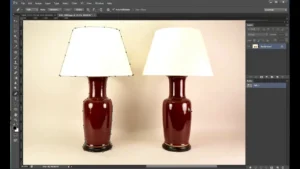
A Clipping Path is a technique used to create a precise vector path or shape with the pen tool in Photoshop. It is a non-destructive method for removing or changing image backgrounds.
This method is primarily used to remove backgrounds or replace them with a white background. The pen tool, a powerful selection tool in Adobe Photoshop, is used to draw the path. Clipping paths are considered the most accurate way to achieve pixel-perfect selections.
Creating a path around a simple image is fairly straightforward, but handling a multi-layered image requires more effort and skill.
Depending on the complexity and purpose of the image, Photoshop and Illustrator offer three types of clipping paths:
-
Single Layer Path
-
Multi-Layer Clipping Path
-
Illustrator Clipping Path
Single Layer Path Photoshop:
Drawing a straightforward path along the hard edges of an image using Photoshop’s pen tool is called a Single Layer Path. Typically, the path is created on the same layer.
This technique is especially useful when you want to remove or replace the background quickly and efficiently.
Multi-layer Clipping Paths:
Creating paths across multiple layers using Photoshop’s pen tool is called a Multi-Layer Path. In other words, it involves extracting two or more subjects from an image by creating separate paths on the same background and removing the subjects individually.
Multi-Layer Paths are especially useful for retouchers, as they allow precise adjustments or modifications to specific parts of an image without affecting the rest.
Illustrator Path
In Illustrator, a Clipping Path refers to creating one or more vector shapes that follow the subject or specific parts of an image. It is a non-destructive path of any shape or design.
This technique allows you to resize images as needed without affecting their resolution, maintaining quality at any scale.
Why Is Clipping Path Important?
A clipping path is essential for extracting any subject from its background. Using the pen tool to carefully trace the edges of an image ensures a precise and accurate selection, even for complex images.
Moreover, if you need a transparent image for an e-commerce store or to print in a magazine, a clipping path is necessary. This technique allows you to remove unwanted parts of an image, making it look more realistic and visually appealing.
What Are the Uses of a Clipping Path?
The uses of clipping paths in Photoshop are numerous, as the benefits of this technique are virtually limitless. Photoshop clipping paths offer a versatile and multi-purpose photo editing solution.
Some of the most notable uses of clipping paths include:
Removing The Background From Images:
Removing the background from images is the primary purpose of using clipping paths in Photoshop. Additionally, creating hand-drawn paths around specific parts of an image allows for precise selection of even complex subjects.
Using the pen tool to trace the hard edges of a product image is often easier and more accurate than other selection methods in Photoshop.
Clipping Paths for Retouching and Color Correction :
Multi-Layer Paths are widely used in photo retouching and color correction. These paths are essential for achieving perfect selections in various photo editing tasks.
Photoshop Image Manipulation and Using Clipping Paths:
Photo clipping is a fundamental part of any image manipulation process. To change, correct, or modify a specific section of an image, you first need to select that area, and photo clipping makes this possible efficiently.
Importance of Clipping Path in the Photo Editing Sector
The demand for Photoshop clipping path services is rapidly increasing, especially to meet the needs of the e-commerce industry. For high-quality visuals, e-commerce stores require images with precise dimensions, accurate resolution, and clean backgrounds, making clipping paths essential.
For instance, Amazon does not allow sellers to list product images unless they are properly optimized according to Amazon’s quality guidelines. The same rule applies to other e-commerce platforms, such as Alibaba or Walmart.
Therefore, the main purpose of clipping path services is to meet e-commerce requirements while presenting images in the best possible quality to engage users effectively.
Note: A white background is always preferred, as it is a fundamental requirement for most e-commerce stores. It provides a clear view of the product and helps improve conversion rates.
Therefore, maintaining a white background when using PNG or background-free images is highly recommended, both for human psychology and to boost conversion rates. A professional clipping path service can assist in achieving this effectively.
Who Needs Clipping Path?
A clipping path is a vital tool for graphic designers to create professional-quality images. It enables them to remove unwanted elements such as text, logos, backgrounds, and other distractions from photos or graphics.
The process often involves capturing multiple photographs of the same subject from different angles. The photographer then selects the best shot, and the designer uses software to combine these images into a single, seamless photo.
This technique is highly efficient, saving both time and effort, but it requires a high level of skill and experience to execute correctly.
As a result, every Photoshop professional—including retouchers, photo manipulators, color correction experts, shadow specialists, logo designers, and vector restoration experts—relies on clipping paths.
Conclusion
Enhancing the visual appeal of images using clipping paths in Photoshop can be challenging without proper mastery of the software.
It demands a professional touch and sufficient experience to effectively use Photoshop’s tools, applying the technique to the right images at the right time for optimal results.
FAQs: What Is a Clipping Path?
1. What exactly is a clipping path in Photoshop?
A clipping path is a vector path created using the pen tool in Photoshop that isolates a subject from its background, enabling precise image editing without affecting the original image.
2. What are the main uses of a clipping path?
Clipping paths are mainly used for background removal, object extraction, product photos for e-commerce, multi-layer editing, photo manipulation, shadow creation, and color correction.
3. How is a clipping path different from a magic wand or lasso tool?
Unlike automatic selection tools like the magic wand or lasso, clipping paths are manual and precise, allowing for cleaner, pixel-perfect selections, even for complex or detailed images.
4. What types of clipping paths are available?
There are generally three types:
-
Single-layer clipping paths for simple subjects
-
Multi-layer paths for multiple objects or subjects in the same image
-
Illustrator clipping paths for vector-based, scalable images
5. Why is a clipping path important for e-commerce images?
Most e-commerce platforms require clean, high-quality images with uniform backgrounds, usually white. Clipping paths ensure products meet these standards, improve visual appeal, and enhance conversion rates.
6. Can clipping paths be used for complex images like hair or fur?
Yes, clipping paths are highly effective for detailed and complex images, but for intricate subjects like hair, professionals often combine clipping paths with masking techniques for the best results.
7. Does creating a clipping path affect the original image?
No, a clipping path is non-destructive, meaning the original image remains intact, and edits can be reversed or adjusted at any time.
8. What tools are used to create a clipping path in Photoshop?
The primary tool is the Pen Tool, which allows precise creation of vector paths. Photoshop may also use combination techniques with layers, masks, and adjustment tools.
9. How much does it cost to get a professional clipping path done?
Pricing varies depending on complexity, volume, and service provider. Simple images may cost a few cents per image, while complex multi-layer or high-resolution edits cost more.
10. How can I choose the best clipping path service provider?
Look for experience, portfolio quality, turnaround time, customer reviews, software proficiency, flexibility in service, and revision policies to ensure you get professional results.
11. Can I create a clipping path myself if I am a beginner?
Yes, but it requires practice and understanding of the pen tool. Beginners can start with simple images and gradually move to complex subjects as their skills improve.
12. What is the difference between Photoshop and Illustrator clipping paths?
Photoshop clipping paths are raster-based and suited for images, while Illustrator clipping paths are vector-based, allowing infinite scalability without losing quality.