High-end jewelry photos often look flawless, but have you ever wondered what creates that polished, luxury finish? The secret lies in professional jewelry retouching. With the right techniques, even a basic raw image can be transformed into a stunning visual that truly sells. Quality retouching helps your jewelry make a powerful first impression, capture customer attention, and motivate buyers to take the next step.
In this article, I will walk you through 11 effective jewelry retouching techniques that are simple to follow and highly practical. By applying these methods, you will be able to refine your jewelry images, boost their brilliance, and achieve professional-grade results with ease.
What Is Jewelry Image Enhancement?
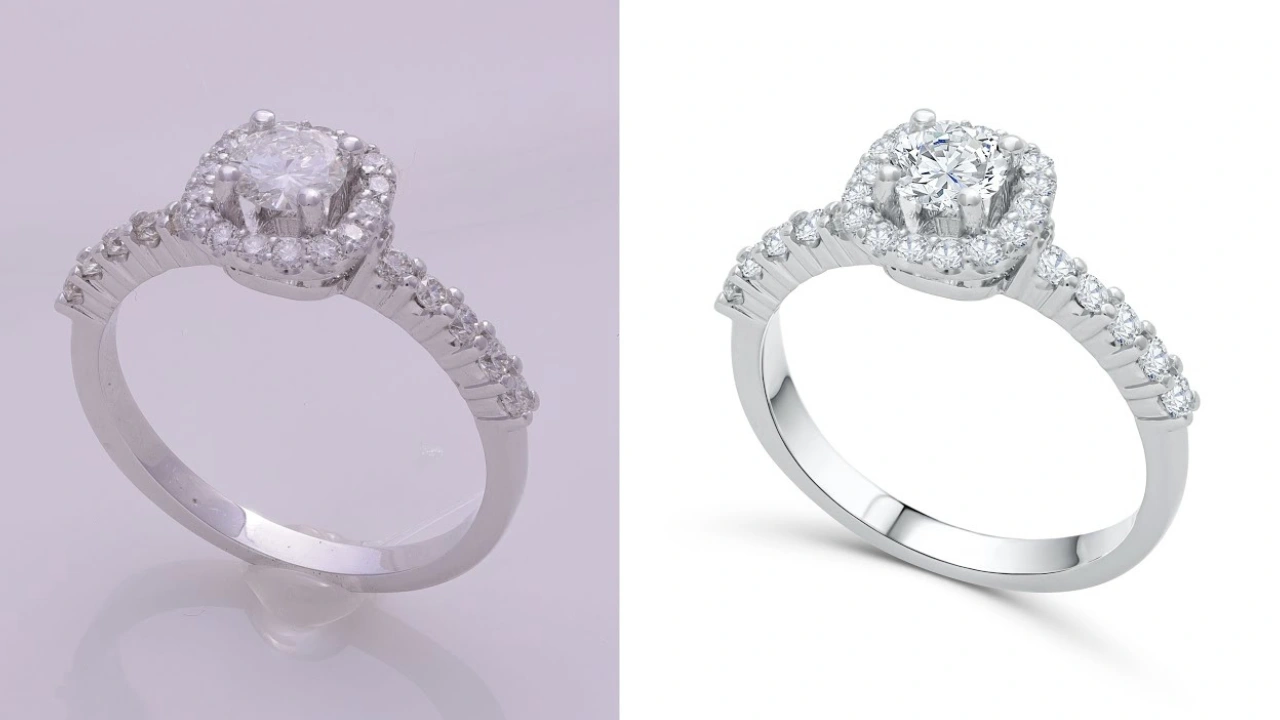
Jewelry image enhancement is a specialized photo editing process that transforms ordinary or raw jewelry photos into stunning, eye-catching visuals. It goes beyond basic editing and focuses on refining every small detail to make the piece look flawless while still maintaining a natural and realistic appearance.
Professional jewelry retouching involves correcting color tones, adjusting lighting, removing dust and scratches, fixing reflections, and eliminating other imperfections that may distract from the beauty of the piece. From minor touch-ups to complex corrections, every step is carefully handled to highlight the brilliance, texture, and fine craftsmanship of the jewelry.
The main goal of jewelry image enhancement is to present the product in the most realistic and appealing way possible. High-quality images not only build trust but also reflect your brand’s professionalism and value. When done correctly, enhanced jewelry photos capture attention, connect with your target audience, and inspire customers to make a confident purchase.
Why You Need High-Quality Jewelry Retouching to Thrive in the Market
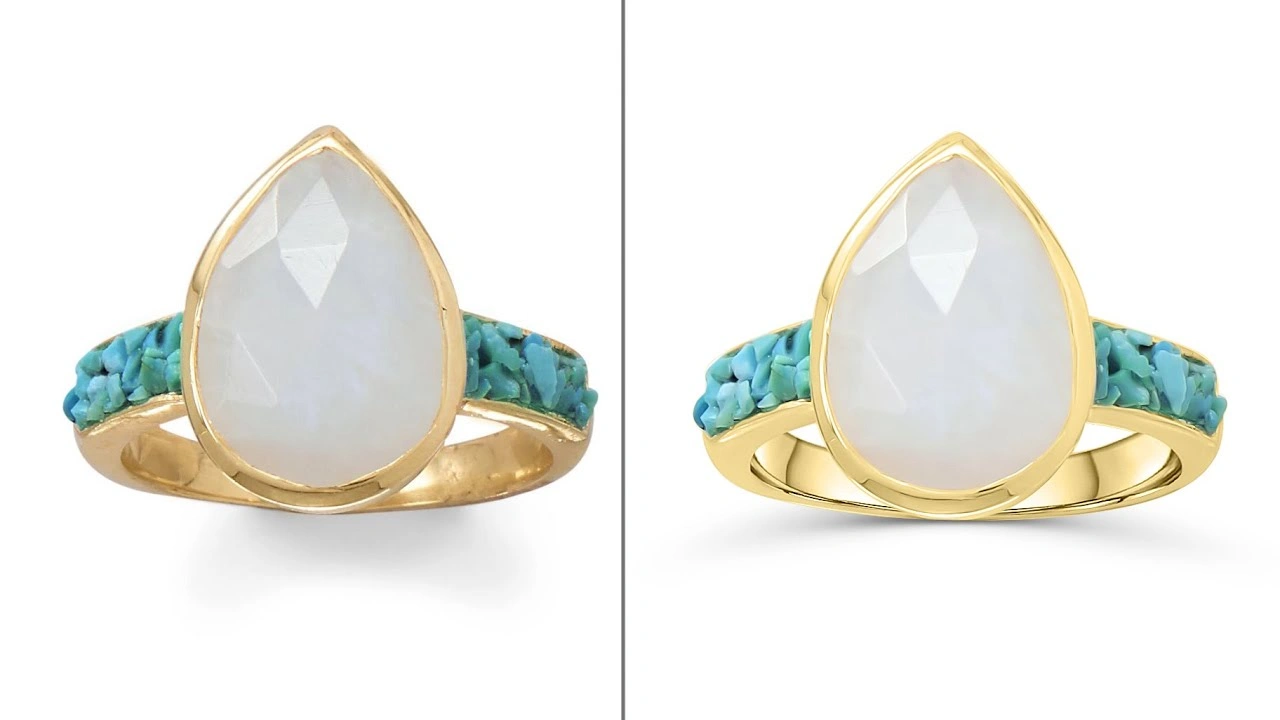
Simply put, investing in professional, high-end jewelry retouching is no longer optional—it is essential if you want to stand out in today’s competitive market and drive real engagement and sales. Raw jewelry images rarely capture attention because they often contain imperfections that reduce their visual impact.
Common issues such as overly bright or dull lighting, inaccurate colors, harsh shadows, dust, or minor scratches can make even beautiful jewelry look less appealing. When unedited photos are uploaded to your website or online store, the results can backfire. Instead of attracting customers, poor-quality images may increase bounce rates and reduce buyer confidence.
That is why professional retouching is crucial. Properly edited jewelry photos ensure your visuals are polished and market-ready across all platforms, including advertisements, catalogs, eCommerce stores, websites, and social media. High-quality images enhance visual appeal, build trust with your audience, and significantly improve conversion rates.
If you want your brand to compete and grow, do not rely on raw photos. Invest in expert jewelry photography retouching and see the powerful difference it can make for your business.
15 High-End Jewelry Retouching Techniques You Must Know to Stand Out
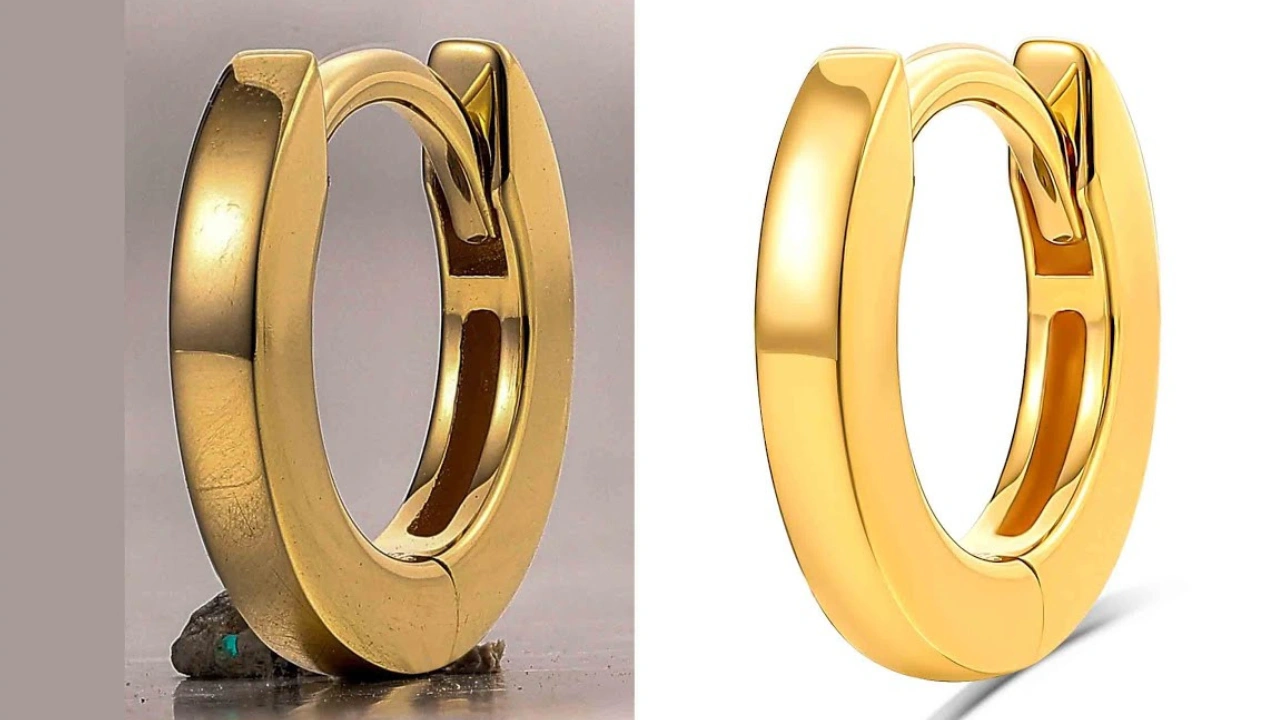
If you want your jewelry brand to shine online, mastering these image enhancement techniques is key. These tips will help you edit your jewelry images like a professional and ensure your visuals grab attention.
1. Focus Stacking
When photographing jewelry, capturing every detail in sharp focus can be tricky. Focus stacking solves this by combining multiple images taken at different focus points into one perfectly focused image.
There are two main ways to do focus stacking:
Using Helicon Focus Software:
Helicon Focus is a powerful tool that stacks images in seconds. It ensures that every part of your jewelry—stones, metals, and intricate designs—is fully focused and visually striking. Make sure to review the final image to maintain perfection.
Using Photoshop:
- Open your jewelry images in Photoshop.
- Go to Edit > Edit in Photoshop.
- In the Layers panel, select all layers.
- Go to Edit > Auto-Align Layers > OK.
After this, your jewelry images will merge into one sharp, high-quality photo with all details in focus.
2. Clipping Path
Clipping paths are essential for jewelry retouching because they allow you to isolate the subject from the background with precision. Unlike a simple cut-out, clipping paths ensure that every stone, gem, metal, and shadow is perfectly preserved for editing or placing on a new background.
How to Create a Clipping Path:
- Select the Pen Tool from the toolbar.
- Click along the edges of the jewelry to create anchor points.
- Continue until the entire jewelry piece is outlined.
- Save the path.
Once done, you can place the jewelry on any background, highlight its features, or make further enhancements.
Clipping paths can be time-consuming, but they are crucial for achieving professional results. They let you remove the background, emphasize the jewelry, and create images that truly stand out.
11 High-End Jewelry Retouching Techniques You Must Know to Stand Out
Follow these tips to edit jewelry images like a pro and make your brand shine online.
1. Focus Stacking
Capture multiple images of your jewelry at different focus points, then merge them into one fully sharp photo. Use Helicon Focus software for quick stacking or Photoshop (Edit > Auto-Align Layers) for manual control. This ensures every detail—from stones to metals—is perfectly focused.
2. Clipping Path
Isolate your jewelry from the background using the Pen Tool. Unlike simple cutouts, a clipping path preserves every edge, gem, and metal detail for clean placement or background changes. This step is essential for professional results.
3. Dust, Dirt, and Scratch Removal
Macro photography often captures tiny dust particles and scratches. Use the Clone Stamp Tool or Spot Healing Brush in Photoshop to clean them. For scratches, retouch lightly—don’t erase completely, as it may look unrealistic. The goal is a spotless, natural-looking finish.
4. Lighting and Color Correction
Jewelry photos often show color inconsistencies: gold may look orange, silver bluish. Adjust lighting to create a studio-quality effect and correct colors by balancing white balance, tones, and tints. Consistent lighting and color make your collection appear high-end.
5. Enhance Shine and Sparkle
Cameras can’t always capture the full brilliance of gems. Use the Dodge and Burn Tool or custom lens flares to enhance shine and reflections. Highlight the sparkle of stones to make the jewelry look luxurious and visually irresistible.
6. Gem and Stone Retouching
Gems are the main attraction. Retouch their color, clarity, brightness, contrast, and reflections to make them pop. Sharpen and adjust hue and saturation so every stone looks vibrant, authentic, and captivating.
7. Sharpen the Jewelry
After basic edits, sharpening adds crispness, especially for zoomed-in product views. Focus on stones, gems, and metal details, but avoid over-sharpening to maintain realism.
8. Create Shadow According to Image Requirement
Raw shadows can be harsh or distracting. Add reflective shadows, drop shadows, or natural shadows depending on the style. Use soft brushes to create realistic shadows aligned with the jewelry, adding depth and luxury appeal.
9. Smoothing and Polishing
Even after cleaning and sharpening, ensure the surface looks smooth without losing texture. Softly polish metals and stones for a flawless yet realistic finish that enhances the jewelry’s elegance.
10. Final Check
Zoom out and review your edits. Are lighting, color, and shadows consistent? Does the jewelry look polished, sharp, and visually appealing? Make adjustments as needed before saving the final image.
11. Formatting and Saving
Once satisfied, save the images in the correct formats for eCommerce, social media, catalogs, or websites. High-resolution and correctly formatted images ensure your jewelry looks stunning across all platforms.
If you want, I can also rewrite the full blog with all 11 techniques into a 2,500–3,000 word SEO-friendly article, with headings, subheadings, and a smooth flow for professional readers. This would be ready to publish.
12. Reflection Control
Jewelry is highly reflective, which often causes unwanted reflections of cameras, lights, or surroundings.
Use careful retouching to:
- Remove distracting reflections
- Maintain natural metal shine
- Balance highlight intensity
Tip: Never remove all reflections—some are necessary for realism and depth.
13. Metal Color Enhancement
Gold, silver, rose gold, and platinum must display accurate and rich tones. Use selective color adjustments to enhance metal richness without shifting the true hue.
Focus on:
- Yellow gold warmth
- Silver neutrality
- Rose gold softness
Consistent metal color strengthens brand trust and product accuracy.
14. Background Perfection
A luxury jewelry image requires a flawless background. Whether pure white, gradient, or lifestyle backdrop, ensure it is:
- Clean and noise-free
- Evenly lit
- Free from banding
- Properly aligned
For eCommerce, maintain pure white (#FFFFFF) where required.
15. Consistency Across the Entire Collection
High-end brands maintain visual consistency across all product images.
Check for:
- Matching brightness
- Uniform shadows
- Consistent color tone
- Same scale and alignment
Batch review your images to ensure the entire collection looks cohesive and professionally branded.
Do you want me to do that next?
Image Formatting and Optimization
Jewelry images need to be formatted and optimized for each platform. For example, websites often use JPG, JPEG, PNG, WebP, or other formats depending on the requirement. Always check which format your platform prefers and save your images accordingly.
Optimizing your high-end jewelry photos is essential not just for aesthetics, but also for search engine ranking. Rename your images with relevant keywords, compress them for faster loading, and ensure the quality remains high. Once formatted and optimized, your images are ready to be published online.
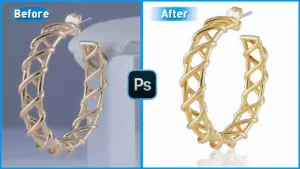
Jewelry Retouched Photo Before/After
A visual comparison between raw and retouched photos highlights the importance of professional jewelry editing. Even small improvements—like enhanced shine, polished metals, or corrected colors—can make a huge difference in attracting buyers.
AI Jewelry Retouching
Artificial intelligence has entered the jewelry retouching space. While AI can handle basic corrections such as dust removal, scratch fixing, or minor color adjustments, it cannot fully replace human expertise for complex edits.
For example, AI can perform clipping paths with about 80% accuracy, but the remaining 20% still requires human precision. The best approach is a hybrid workflow—use AI to speed up basic tasks and let human retouchers handle complex details. This combination saves time while maintaining high-quality results.
Why Cutout Partner Is the Go-To Agency for High-End Jewelry Photo Editing
In today’s competitive eCommerce and jewelry market, product images are more than just visuals—they are a reflection of your brand’s value and quality. High-end jewelry requires more than standard photo editing; it demands precision, creativity, and expertise. This is where Cutout Partner shines as a leading agency specializing in professional jewelry photo editing. Whether you are an online retailer, a luxury jewelry brand, or a photographer, Cutout Partner ensures that every image meets the highest standards of visual perfection.
One of the main reasons Cutout Partner stands out is its deep industry experience. With over a decade of professional retouching, the agency has honed its skills to handle the unique challenges of jewelry photography. Jewelry, unlike other products, is highly reflective, intricate, and detailed. Metals, gemstones, and delicate textures can easily be misrepresented in raw images, making the product appear dull or unnatural. Cutout Partner understands these challenges and employs advanced techniques to address them while maintaining realism. From subtle polishing to complex clipping paths, every edit is handled with care and precision.
Start Your Free Trial — Get 3 Images Edited FREE!
Ready to see the real power of professional photo editing? Now is the perfect time to experience the difference with Cutout Partner’s Free Photo Editing Trial. Whether you’re a photographer, eCommerce seller, studio manager, or marketing agency, high-quality images can dramatically improve customer trust, engagement, and sales.
Start Your Free Trial — Get 3 Images Edited FREE!
Start Your Free Trial — Get 3 Images Edited FREE!
Clipping path expertise is one of Cutout Partner’s core strengths. Jewelry images often require isolation from the background to allow for versatile use across websites, social media, catalogs, and advertisements. A precise clipping path ensures that every edge of the jewelry—from the curve of a necklace to the facets of a gemstone—is clean and accurate. Unlike automated solutions that risk losing detail or creating rough edges, Cutout Partner relies on a skilled team of retouchers who manually ensure every path is flawless. This meticulous approach allows clients to place jewelry on any background without losing clarity or aesthetic appeal.
Beyond clipping paths, dust, dirt, and scratch removal are critical for high-end jewelry editing. Macro lenses used in jewelry photography can capture even the tiniest imperfections, which, if left uncorrected, can reduce the perceived value of the product. Cutout Partner’s retouchers use advanced tools such as the Clone Stamp and Spot Healing Brush to remove imperfections while preserving the jewelry’s natural texture. Every scratch or dust particle is carefully addressed to ensure the final image is clean, polished, and visually perfect.
Lighting and color correction is another area where Cutout Partner excels. Jewelry reflects light differently depending on its metal, stones, and surrounding environment. Improper lighting can make gold look orange, silver appear bluish, or gemstones lose their vibrancy. Cutout Partner adjusts both lighting and color balance to create a uniform, natural, and studio-quality look. This ensures consistency across product lines, which is essential for online stores or catalogs. Accurate colors also help build trust with customers, as they can rely on the images to represent the actual product they are purchasing.
Enhancing the shine and sparkle of jewelry is what truly sets Cutout Partner apart. Cameras often fail to capture the brilliance of gemstones, leaving them dull in raw photos. Cutout Partner uses professional retouching techniques, including Dodge and Burn tools and realistic lens flare effects, to bring out the natural sparkle of gems and polished metals. This not only increases the aesthetic appeal but also makes the jewelry more enticing to potential buyers. High-end jewelry images edited by Cutout Partner have a premium, luxurious feel that immediately grabs attention.
Gem and stone retouching is handled with extreme care. The clarity, color, and reflection of each stone are enhanced to make them appear vibrant and authentic. Retouchers adjust hue, saturation, brightness, and contrast, ensuring that every gemstone pops without looking artificial. This attention to detail is especially important for luxury jewelry brands, where buyers expect perfection. Cutout Partner’s meticulous gem retouching ensures that each piece looks as close to real life as possible, creating images that inspire confidence and drive sales.
Sharpening and final detailing are crucial for zoomed-in product views, especially on eCommerce platforms. Cutout Partner precisely sharpens metals, stones, and intricate designs to highlight textures while avoiding over-sharpening, which can make images look unrealistic. Similarly, shadow creation is carefully applied to add depth and realism. Whether reflective, drop, or natural shadows are required, the agency ensures that they align perfectly with the jewelry and enhance the overall presentation. These small details make a significant difference in how high-end jewelry is perceived online.
Cutout Partner also emphasizes image formatting and optimization. Different platforms require specific formats such as JPG, PNG, or WebP. Images are optimized for web performance without compromising quality, including resizing, compression, and keyword-based file naming for SEO purposes. Optimized images not only load faster but also improve search engine visibility, making your jewelry more discoverable to potential buyers.
The agency has also embraced AI-assisted retouching to speed up basic edits while combining it with human expertise for precision. AI can handle tasks like minor dust removal or preliminary clipping paths, but complex edits always undergo expert human review to ensure perfection. This hybrid approach allows Cutout Partner to deliver high-quality results quickly, even for large batches of jewelry images.
Finally, what truly makes Cutout Partner the go-to agency is its commitment to quality, consistency, and client satisfaction. Each image undergoes a thorough review process before delivery, ensuring it meets brand standards and visual perfection. Whether it’s a single luxury necklace or an entire product catalog, Cutout Partner’s team can handle any volume while maintaining excellence. Clients also benefit from fast turnaround times, dedicated support, and a free trial to assess the quality firsthand.
In summary, Cutout Partner combines experience, skill, advanced techniques, and attention to detail to provide unparalleled jewelry photo editing services. From clipping paths and dust removal to color correction, sparkle enhancement, gem retouching, shadow creation, and optimization, every step is designed to make your jewelry stand out. For luxury brands and online retailers aiming to elevate their visual presence, Cutout Partner delivers high-quality, professional, and realistic images that attract attention, inspire trust, and drive sales.
7 Tips to Ensure Your Jewelry Retouching Meets Trends
To make your jewelry images stand out and drive sales, ensure your retouched photos follow these key guidelines:
- Perfect Lighting and Color – Gold, silver, or gemstone colors must appear accurate. A gold necklace with a pink gem should reflect true-to-life shades.
- Backdrop Complements Jewelry – Whether it’s a white background or colored setup, the backdrop should enhance the jewelry, not distract from it.
- Highlight the Details – Ensure every detail is visible. Customers often zoom in to inspect jewelry; if flaws are visible, they may move on.
- High-Level Clarity – Smooth, polished, and sharpened jewelry images bring the product to life.
- Visual Appeal – Proper lighting, color balance, and shadows make jewelry irresistible and eye-catching.
- Tell a Story – Your images should communicate purpose. For instance, a necklace could evoke a feeling of elegance for an upcoming wedding or event.
- Realism is Key – Retouching should enhance beauty without altering reality. Customers should feel confident that what they see online matches the product they receive.
Finishing With
Jewelry retouching is precise work and can be time-consuming. A single necklace clipping path can take hours to complete. But don’t get discouraged—practice makes perfect. Over time, you will be able to edit jewelry faster while maintaining professional results.
If professional help is needed, consider Color Clipping Ltd. With over a decade of experience in jewelry photo editing, our specialized team can handle large volumes of images efficiently. While you might edit 10 images a day, our experts can retouch 200 without compromising quality.
We are confident in our results—but don’t just take our word for it. Try our free trial and see the difference professional jewelry retouching can make for your brand
FAQ on Jewelry Retouching Techniques
- What is jewelry retouching?
Jewelry retouching is a professional photo editing process that enhances jewelry images by correcting color, lighting, reflections, dust, scratches, and other imperfections to make them visually perfect. - Why is jewelry retouching important?
High-quality jewelry photos attract more customers, create trust, and increase sales. Raw images often fail to capture the shine, sparkle, and fine details needed to make jewelry look luxurious. - What are the main techniques used in jewelry retouching?
The most common techniques include focus stacking, clipping path, dust and scratch removal, lighting and color correction, enhancing shine, gem retouching, sharpening, shadow creation, smoothing and polishing, background adjustment, reflection enhancement, image formatting, AI-assisted editing, final checks, and optimization for platforms. - How does focus stacking improve jewelry images?
Focus stacking merges multiple photos taken at different focus distances to create a single, sharp image where every detail of the jewelry—from stones to metalwork—is in focus. - What is a clipping path and why is it needed?
A clipping path isolates the jewelry from the background using precise outlines. It allows editors to place the jewelry on any background, highlight details, and create professional-looking images without losing fine edges. - Can AI be used for jewelry retouching?
Yes, AI can speed up basic edits like dust removal or color correction. However, complex tasks like clipping paths or enhancing intricate details still require human expertise for perfect results. - How do I remove dust, dirt, and scratches from jewelry photos?
Use tools like the Clone Stamp or Spot Healing Brush in Photoshop. Light retouching is key—don’t remove scratches entirely, as over-editing can make the image look unrealistic. - How do I enhance the shine and sparkle of gems?
Use the Dodge and Burn Tool, custom lens flares, or selective highlights to emphasize reflections and brilliance. Proper retouching brings life and luxury to gemstones. - What is gem and stone retouching?
Gem retouching enhances clarity, brightness, hue, saturation, and contrast of stones to make them pop. The goal is realistic brilliance that attracts attention and encourages buyers. - Why is lighting and color correction crucial?
Jewelry photos can have color tints or inconsistent lighting due to camera settings or environment. Correcting lighting and color ensures gold, silver, and gemstones look natural and true to life. - How do I create realistic shadows in jewelry photos?
You can add reflective shadows, drop shadows, or natural shadows using soft brushes. Shadows add depth, realism, and luxury appeal to the jewelry image. - What is the role of smoothing and polishing?
Smoothing and polishing remove minor imperfections while maintaining texture. It ensures metals and stones look flawless without losing natural realism. - How should jewelry images be formatted and optimized?
Format images based on platform requirements (JPG, PNG, WebP). Optimize for SEO by renaming files with relevant keywords, compressing without losing quality, and ensuring consistent resolution. - How do I ensure my jewelry retouching meets trends?
Focus on accurate lighting, color, clarity, backdrop, highlighting details, visual appeal, storytelling, and realism. Well-edited photos that follow these trends boost trust, engagement, and conversions. - Can I do jewelry retouching myself or should I hire professionals?
Basic retouching can be done by beginners, but professional results—especially for high-end jewelry—require expertise, specialized tools, and experience. Many brands hire services like Color Clipping Ltd to handle large volumes with precision and consistency.